New year new me, I figured that I wanted to start writing and sharing more about my reverse engineering projects.
I thought that Apple Intelligence would be quite an interesting project to write about since there’s quite little public information about how and what things make up the whole system. It was supposed to be iOS 18’s main selling point and I got curious about what goes on behind the scenes powering its ‘brain’.
I do have to preface that there are still many subsystems within Apple Intelligence that I have yet to explore (hopefully when I have time), and this post will mainly be on Knosis which was what I’ve spent most of my time reversing.
Majority of the information below are statically analysed from iPhone 17 iOS 26.1 ipsw.
Version: 23B85__iPhone17,1
Knosis
Knosis is one small part of the Apple Intelligence’s infrastructure whose sole purpose seems to be Apple’s Knowledge Graph Query (KGQ) language and execution engine. It serves as the bridge for retrieving ordered data from unstructured queries.
The Server
The initialisation of a Knosis XPC server is handled by KnosisServer.init(config:indexHandler:) which expects a IntelligencePlatform.KnosisConfig configuration and indexHandler array.
The config contains 3 fields:
vopFileURLintentMapFileURLdefaultResultLimit
The first 2 files can be found in the IntelligencePlatform.framework bundle root. The vopFile (virtualOperators.json) seems to list a bunch of manually defined helper functions for working with RDF triples. These functions range from listing to filtering, with various levels of specificity, covering everything from entity lookups to wildcard full-text searches.
"filterByPredicate": { "args": [ "s", "p" ], "description": "filter results by matching predicate", "implicitArg": "s", "kgq": "match($s, $p, NIL, indexType=noIndex)", "name": "", "repeatedArg": false},
"getFlightReservationNumber": { "args": [ "s" ], "description": "get flight reservation number", "implicitArg": "s", "kgq": "get($s,PS51)", "name": "", "repeatedArg": false},while the intentMapFile provides the list of capabilites integrated using App Intents for systems applications.
For example, we see
"MusicEntitySearch": [ { "args": [ "adamId" ], "conditionKGQ": "intentArgName(adamId_1)", "flags": [ "skipFactsRender", "musicEntityRenderer" ], "kgq": "entityForIdTypeFromGKSLive(Adam_ID,$adamId,[PS486,PS358,PS123,PS137,PS106,PS10])", "name": "search music entities for adamIds from live GKS" }]So what does the Knosis server actually do?
Functionally, the Knosis server operates as the oracle for the system’s knowledge graph. It abstracts the complexity of raw database queries and serves as the retrieval engine for two types of data:
- Personalized Context: Dynamic data harvested from user interactions (local knowledge).
- Global Context: A static database of generalised facts and common-sense reasoning models (world knowledge).
To query the database, a request is sent to the server, which will execute the function KnosisServer.executeKGQ(request:). The request consists of a kgq string, which is used to query the internal knowledge database.
struct IntelligencePlatform::KnosisKGQRequest { Swift::String query; Swift::String kgq; Swift::OpaquePointer contextFacts; Swift::Int limit; Swift::Int offset; Swift::Bool enableDebug; Swift::Bool enableTextualization;}Query Processing
KGQ (Knowledge Graph Query)
The KGQ querying language was developed by Apple solely for the purpose of interacting with their knowledge graph storage. Think of it as SQL, but for their proprietary graph database. Within the IntelligencePlatform.framework contains the lexer and parser which tokenises and builds an QueryTree(their version of AST) from the kgq query.
I believe
IntelligencePlatformQuery.frameworkalso handles some of the querying work, although I haven’t reversed anything from it yet.
Lets look at one of the kgq fields from the intent map file as an example.
entityForIdTypeFromGKSLive(Adam_ID,$adamId,[PS486,PS358,PS123,PS137,PS106,PS10])
entityForIdTypeFromGKSLive is another ‘operator’ defined in the virtual operator json.
"entityForIdTypeFromGKSLive": { "args": [ "idtype", "ids", "properties" ], "description": "get entities from live global knowledge api", "implicitArg": "s", "kgq": "qselect(NIL, all(pvp(PS1,$idtype,indexType=liveGlobalKnowledgeIndex),pvp(PS1,$ids,indexType=liveGlobalKnowledgeIndex))).pvp(PS72,indexType=liveGlobalKnowledgeIndex).match($properties,NIL,indexType=liveGlobalKnowledgeIndex)", "name": "", "repeatedArg": false},Internally, the virtual operator will be flattened into the more verbose kgq query and passed on for processing and execution.
LexerV2
The first step of processing the kgq string is delegated to the LexerV2 which takes in a kgq string.
Similar to modern compilers, the lexer produces a stream of tokens (LexerV2.Token) from the kgq string.
int,doublestring,identifierkeyword,variableequal,doubleEqual,exactEqual,notEqualcomma,lBracket,rBracket,lParen,rParen,semiColon,dotminus,plus,asterisk,slashall,get,compute,filter,sum,avg,count,uniq_count
ParserV2
This step seems to be responsible of enforcing the AST sanity before anything runs, making sure that
- AST maximum depth is less than 25
- Operators exists and free of syntax errors.
Looking at the swift classes in the dyld, we can see the individual operator’s classes which the parser instantiates to represent operations at runtime.
DefaultOperator├── Virtual├── Qselect├── ForEach├── Match├── Count├── Text├── Qget│ └── Qpropget├── Pvp├── Get│ └── Triple├── ArithmeticOperator│ ├── Sub│ ├── Add│ ├── Multiply│ ├── Divide│ └── Avg├── LogicalOperator│ ├── And│ ├── All│ └── Or├── EntityOperator├── Sort│ ├── SortDesc│ └── SortAsc├── RenderDateTime└── Comparison ├── LessThan ├── GreaterThanEqual ├── LessThanEqual └── GreaterThanQueryTree (AST)
The AST is internally represented as the swift class QueryTree, comprising of QueryNode.
struct Analysis::IntelligencePlatform::QueryTree { Swift::String query; // String? Swift::String kgq; QueryNode? root; IntentRequest? intentArgInfo; Swift::Int limit Swift::Int offset; Swift::Bool debug; Swift::Bool textualize;}
struct Analysis::IntelligencePlatform::QueryNode { Swift::String name; Swift.Dictionary<Swift.String.KnosisQueryParam>? args; QueryNode? next; Swift::Int limit Swift::Double weight; IntelligencePlatform.KnosisIndexType indexType [Swift.String : Swift.String] params Swift::Bool executed; Swift::Bool skipExec; [Swift.String]? resultIds; Swift.String? vopName;}For each query request, a QueryContext wraps the built QueryTree and is used to execute the query. It will recusively walk through the AST, to execute the sub-trees and wraps the overall result in a KnosisResult at the end.
During execution, if a indexType is specificied in the kgq, it will bind the respective indexHandler accordingly and execute from it. These indexHandlers will query the relevant graph stores accordingly to retrieve the information.
enum __udec IntelligencePlatform::KnosisIndexType : __int8{ IntelligencePlatform_KnosisIndexType_none = 0u, IntelligencePlatform_KnosisIndexType_stableGraphIndex = 1u, IntelligencePlatform_KnosisIndexType_noIndex = 2u, IntelligencePlatform_KnosisIndexType_eventGraphIndex = 3u, IntelligencePlatform_KnosisIndexType_ontologyIndex = 4u, IntelligencePlatform_KnosisIndexType_contextIndex = 5u, IntelligencePlatform_KnosisIndexType_localGraphIndex = 6u, IntelligencePlatform_KnosisIndexType_staticGlobalKnowledgeIndex = 7u, IntelligencePlatform_KnosisIndexType_liveGlobalKnowledgeIndex = 8u, IntelligencePlatform_KnosisIndexType_unknownDefault = 9u,};Data Stores
So thats how the database is being queried, the question now becomes where do we query from.
If we start tracing from KnosisServer.init(config:platformConfig:) we will eventually reach a function (sub_1C49A9674) that intialises 3 stores,
OntologyStoreGlobalKnowledgeStoreGraphStore
These stores will have a SQL database backing its operations respectively.
Before we start looking at what these datastores hold, I figured that you should probably get acquainted with some terminologies first.
1. Triples
A RDF triple or semantic triple is the most basic, atomic unit of data, consisting of three parts:
- Subject
- Predicate
- Object.
It is essentially a “bite-sized fact” or a simple statement that links two entities or links an entity to a value.
For example, if we want to encapstulate the idea ‘Adam sells books’, we can store Adam as the subject, books as object and the verb sells as the predicate (relationship). The triple will look something like :
[Adam] -- sells --> [books]
In the context of knowledge graph, the subject and object can be represented as nodes, and the predicate is the edge (relationship) between them. This format allows for a uniform and universal method of encoding almost any information, from text documents to database entries.
2. Ontology
It acts as a mapping and rulebook, which defines the types of objects, the relationships that can exist between entities, and constraints on those relationships.
An ontology is used to:
- Define meaning of individual elements and concepts within a domain
- Establish rules and constraints, such as class hierarchies (e.g., “A book is a type of publication”).
- Enable reasoning which allows machines to perform logical inference, meaning new facts can be derived from existing data and rules.
OntologyStore
The ontology store is responsible of keeping track of the entities, properties, and relationships within a specific domain.
It defines the “what” (things like ‘Customer’, ‘Product’), “how they relate” (‘buys’, ‘is a type of’), and “rules” governing them, which powers the knowledge graphs, reasoning, and semantic understanding in systems
It is initialised in OntologyStore.init(config:), which will create a OntologyDatabase instance with the backing database as ontology.db.
Within the OntologyDatabase, the following data from the json files will aggregated using the OntologyParser:
class.jsoncontains the mapping between class IDs and its label
{ "classId": "CS13", "intValue": 30, "label": "membership relationship type"},inheritance.jsoncontains a list of parent-child relationship between classes. For example,
{ "childrenId": [ "CS165", // employment relationship type "CS31" // performance relationship type ], "parentId": "CS13" // membership relationship type}predicate.jsoncontains a list of information on the predicates which are used to express the intended relation between a subject and object in the triples. For example, this meants thatPS314represents a ‘sport’ relationship.
{ "domain": [ "SB71" // "sports game event" ], "intValue": 287, "label": "sport", "predicateId": "PS314", "range": [], "subjectType": "string"},relationship_type.jsoncontains the mapping of a relationship to its enforced object type. For example, triples with thenm_songRelationshipTyperelationship should have an object, which is an instance of theSB44(song) class.
{ "objectClass": "SB44", "objectType": "class", "relationshipType": "nm_songRelationshipType"}Similar to the global knowledge store, OntologyParser also has a update/version tracking functionality.
{ "versions": [ { "compatibility": "v4.31", "fileName": "class.json", "versionNum": "v4.32" }, { "compatibility": "v5.04", "fileName": "inheritance.json", "versionNum": "v5.05" }, { "compatibility": "v7.13", "fileName": "predicate.json", "versionNum": "v7.21" }, { "compatibility": "v1.13", "fileName": "relationship_type.json", "versionNum": "v1.14" } ]}The ontology store only stores all the information from the json into the SQL database so that it is easier to query subsequently. It doesn’t perform additional modifications to the data itself other than cleaning up the inheritance structure.
Similar to the other stores, the internal mechanism for database querying is abstracted by GRDB Swift.
When we need to retrieve a class label by its ID, we invoke OntologyStore.loadClasses(classID:).
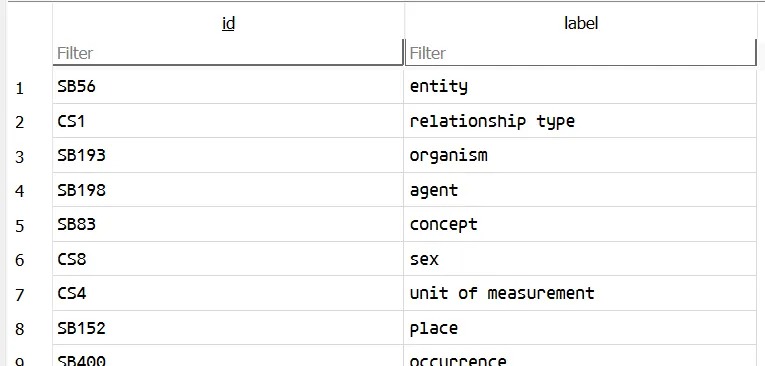
struct _TtC24IntelligencePlatformCore12OntologyPair // sizeof=0x30{ // XREF: _TtC24IntelligencePlatformCore9ClassPair/r unsigned __int8 superclass_opaque[16]; Swift::String id; Swift::String label;};
struct _TtC24IntelligencePlatformCore9ClassPair // sizeof=0x30{ _TtC24IntelligencePlatformCore12OntologyPair super;};Under the hood, this method executes the SQL query and automatically deserializes the result into a Swift ClassPair object since these classes all conform to FetchableRecord. GRDB maps the database columns directly to the object’s instance variables in memory. Never knew this existed, but it looks pretty convenient!
GlobalKnowledgeStore
The backing database is created and stored in the IntelligencePlatform bundle folder, named as globalKnowledge.db.
It is first initialised using the function GlobalKnowledgeDatabase.init(config:). Before creating the database, GlobalKnowledgeDatabase.checkAndLoadAssets() is called, which opens manifest.plist to load the required assets.
{ "assets": [ { "name": "PriorBeliefs", "type": "json" }, { "name": "MediaEntitiesSubgraph", "type": "json" }, { "name": "HolidayEventSubgraph", "type": "json" }, { "name": "LocalizedRelationshipTopics", "type": "json" }, { "name": "PortraitTopics", "type": "json" } ]}There are 2 tables in this database that are of importance.
CREATE TABLE "static_graph" ( "assetId" INTEGER NOT NULL, "subject" INTEGER NOT NULL, "predicate" TEXT NOT NULL, "relationshipId" INTEGER NOT NULL, "relationshipPredicate" TEXT NOT NULL, "object" TEXT NOT NULL, "confidence" DOUBLE NOT NULL, PRIMARY KEY ("subject", "predicate", "relationshipId", "relationshipPredicate", "object") ON CONFLICT ABORT, FOREIGN KEY(assetId) REFERENCES static_assets(id))and
CREATE TABLE "live_graph" ( "subject" INTEGER NOT NULL, "predicate" TEXT NOT NULL, "relationshipId" INTEGER NOT NULL, "relationshipPredicate" TEXT NOT NULL, "object" TEXT NOT NULL, "ttlTimestamp" DOUBLE NOT NULL, "timestamp" DOUBLE NOT NULL, "clients" INTEGER NOT NULL, PRIMARY KEY ("subject", "predicate", "relationshipId", "relationshipPredicate", "object") ON CONFLICT REPLACE)both of them are responsible of storing the facts as triples. Each row in the static_graph table is represents the StaticKnowledgeTriple Swift class, and querying/adding of knowledge will be operated on the StaticKnowledgeTriple instance. During creation of the database, the data in the json files listed in manifest.plist will be used to populate the static_graph table.
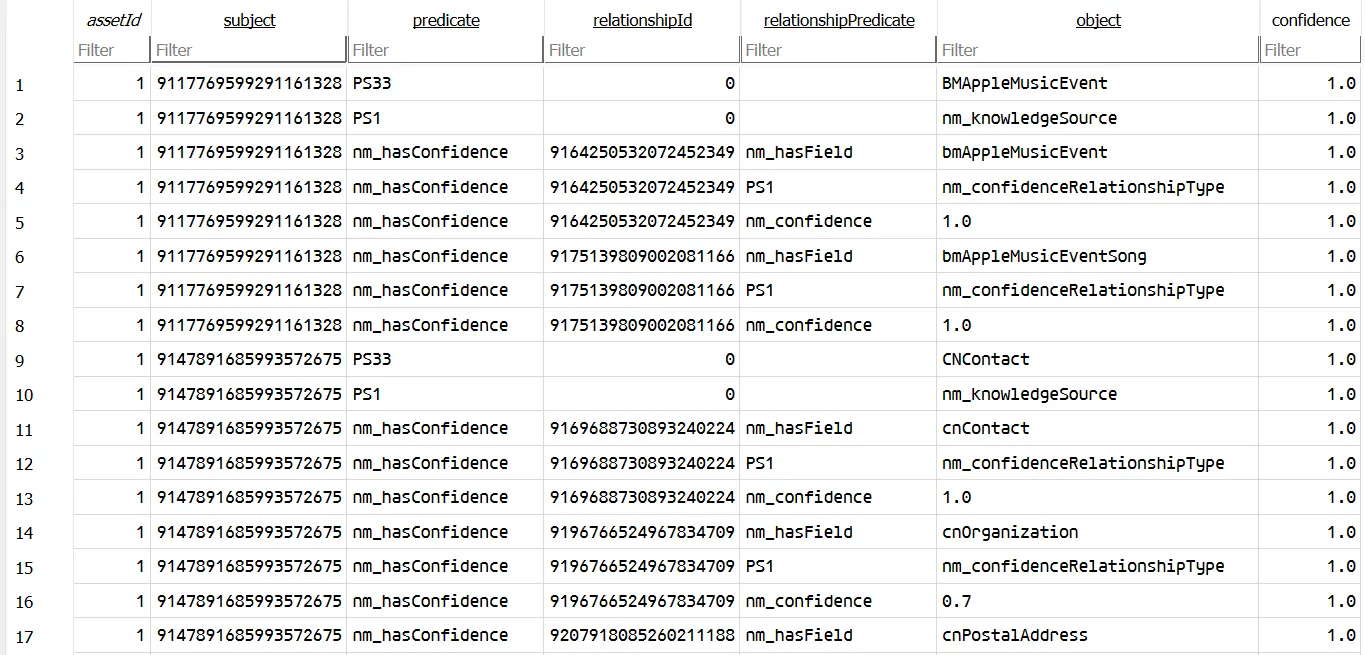
By the looks of it, it seems that the data mainly consists of a wide range of facts and information, ranging from sports teams to music artists.
Likewise, for live_graph, each row corresponds to a swift class LiveGlobalKnowledgeTriple instance. The purpose of the graph seems to be a ordered graph caching requests made by clients using the LiveGlobalKnowledgeApi functions. The system seems to be able to make ‘live’ requests to search the web and craft new knowledge triples on the fly. The actual action of searching on the web is delegated to the PegasusAPI and not handled by the IntelligencePlatform itself.
While reversing the checkAndLoadAssets function, I noticed that the CoordinationXPC service functions as the central orchestrator for constructing the knowledge graph, managing cross-process state synchronization through the
-[CoordinationXPC.Server sourceUpdatedWithSourceType:sourceIdentifier:completion:] method. When the assets are to be updated, the method will be invoked, which retriggers the knowledge construction pipeline.
Visualising Triples
Since we know how the database is structured, we can simply retrieve all the triples and normalise the predicate column in the static_graph table with the label field in predicate table of ontology.db.
import sqlite3import pandas as pdimport networkx as nx
gk_db = "../IntelligencePlatform/globalKnowledge.db"onto_db = "../IntelligencePlatform/ontology.db"
gk_conn = sqlite3.connect(gk_db)onto_conn = sqlite3.connect(onto_db)gk_df = pd.read_sql_query("SELECT subject, predicate as pred_id, object as obj_id FROM static_graph;", gk_conn)pred_df = pd.read_sql_query("SELECT id as pred_id, label as pred FROM predicate;", onto_conn)class_df = pd.read_sql_query("SELECT id as obj_id, label as object FROM class;", onto_conn)gk_conn.close()onto_conn.close()
merged_df = gk_df.merge(pred_df, on="pred_id", how="left")merged_df = merged_df.merge(class_df, on="obj_id", how="left")merged_df['pred'] = merged_df['pred'].fillna(merged_df['pred_id'])merged_df['object'] = merged_df['object'].fillna(merged_df['obj_id'])df = merged_df[["subject", "pred", "object"]]
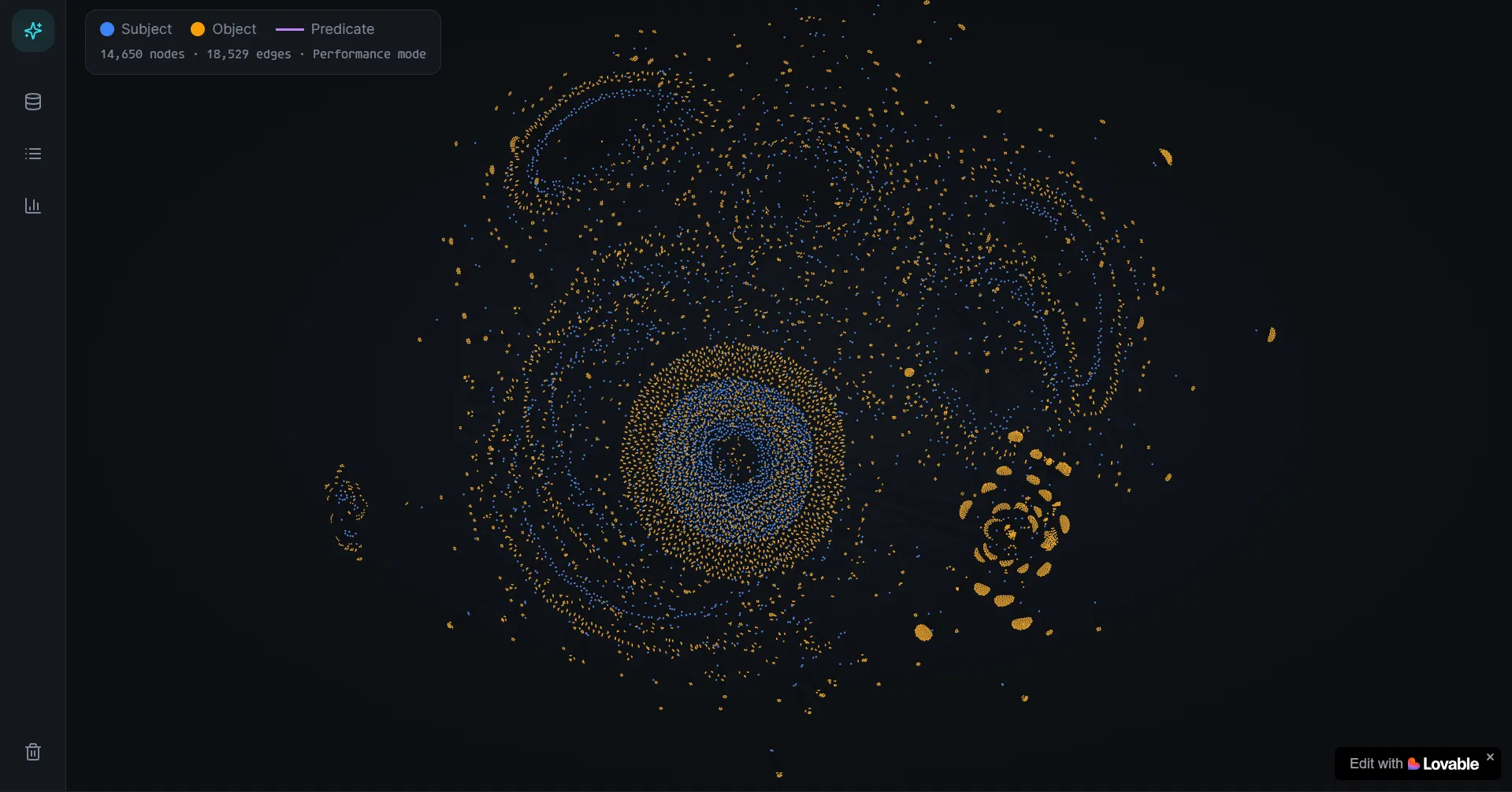
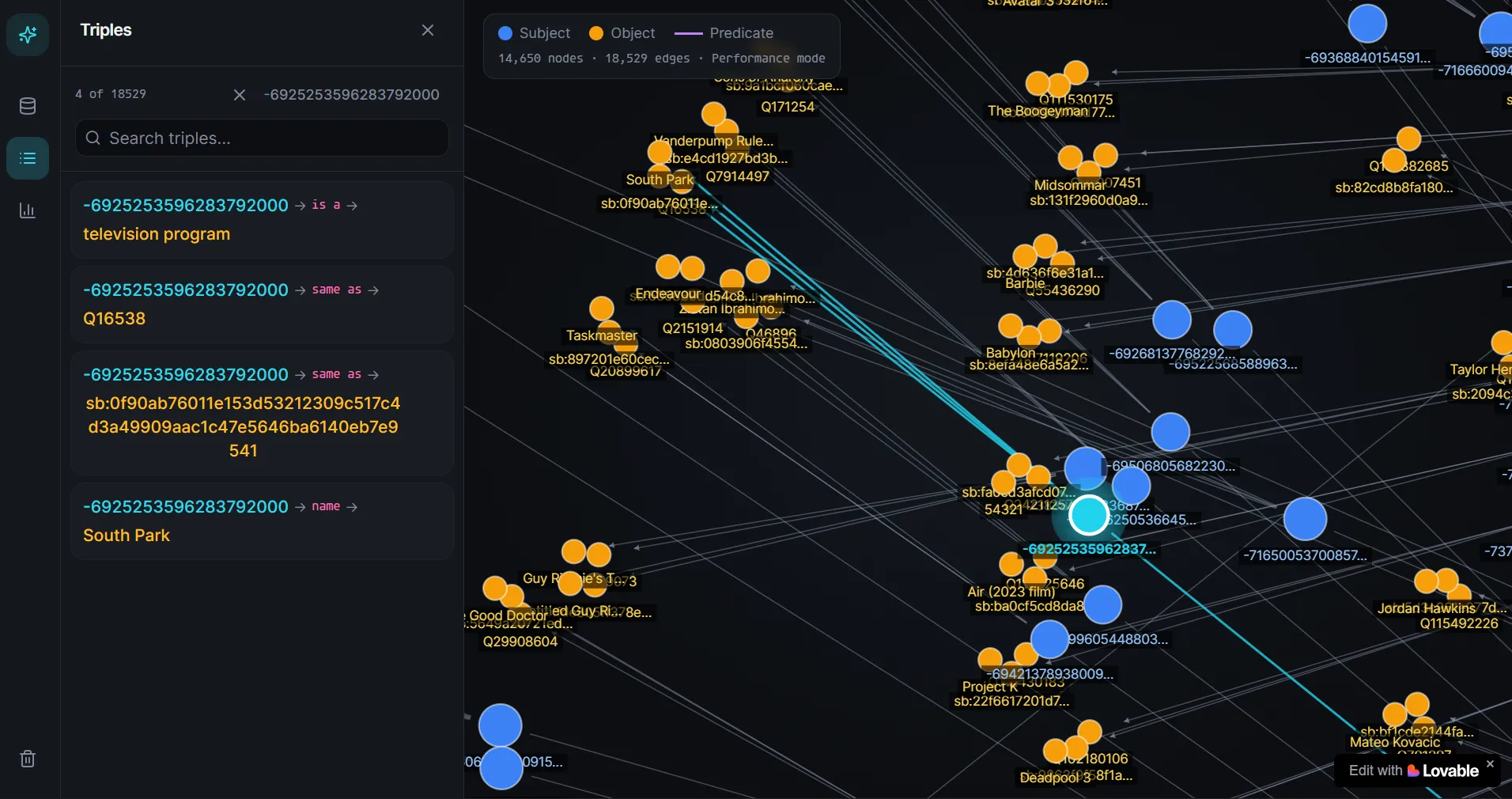
G = nx.Graph()for _, row in df.iterrows(): G.add_edge(row['subject'], row['object'], label=row['pred'])nx.write_gml(G, "globalknowledge.gml")But I realised the graph is kind of ugly and not very interactive to use. So, with 15 minutes of vibe-coding, we can visualise the whole ‘brain’ of Knosis in a webapp instead, which honestly looks kinda cool…
GraphStore
Similar to the GlobalKnowledgeDatabase, the GraphStore is also a triple-storing database which wraps a lower-level GraphDatabase component. A GraphStore class is initialised using GraphStore.init(config:) which will eventually create the backing database located in graph.db.
What sets the GraphStore apart from the GlobalKnowledgeStore is that it contains ‘learnt’ data that is unique to the user. The data is fed from multiple streams referred internally as ingestors.
If we search from the defined swift classes, we can see that there are 30 ingestors.
CNContactFullSourceIngestorRelationshipFullSourceIngestorPHPersonSourceIngestorPGRelationshipFullSourceIngestorBMAppleMusicEventDeltaSourceIngestorBMAppleMusicEventSourceIngestorCNContactDeltaSourceIngestorEKEventSourceIngestorEntityInteractionHistoryIngestorFAFamilySourceIngestorFavoriteSportsTeamSourceIngestorFutureLifeEventDeltaSourceIngestorHKEmergencyContactSourceIngestorINGroupSourceIngestorINPersonSourceIngestorIPEntityTaggingPersonInferenceSourceIngestorLifeEventSourceIngestorLifeEventDeltaSourceIngestorLSBundleRecordSourceIngestorScreenTimeSourceIngestorSGContactSourceIngestorSGEventSourceIngestorWalletClassicOrderDeltaSourceIngestorWalletClassicOrderSourceIngestorWalletEmailOrderDeltaSourceIngestorWalletEmailOrderSourceIngestorWalletTrackedOrderDeltaSourceIngestorWalletTrackedOrderSourceIngestorWalletTransactionOrderDeltaSourceIngestorWalletTransactionOrderSourceIngestorThese ingestors will then be responsible of structuring their data into sensible triples and adding it to graph.db within their individual pipelines.
If anyone is interested where to find the ingestors, you can x-ref from the function
GraphStore.tripleInsertingTransaction(transactionBody:). The first argument (transactionBody) is a function that is responsible for producing the actual triples to be added into the graph store from the ingestor.
Visualising Triples
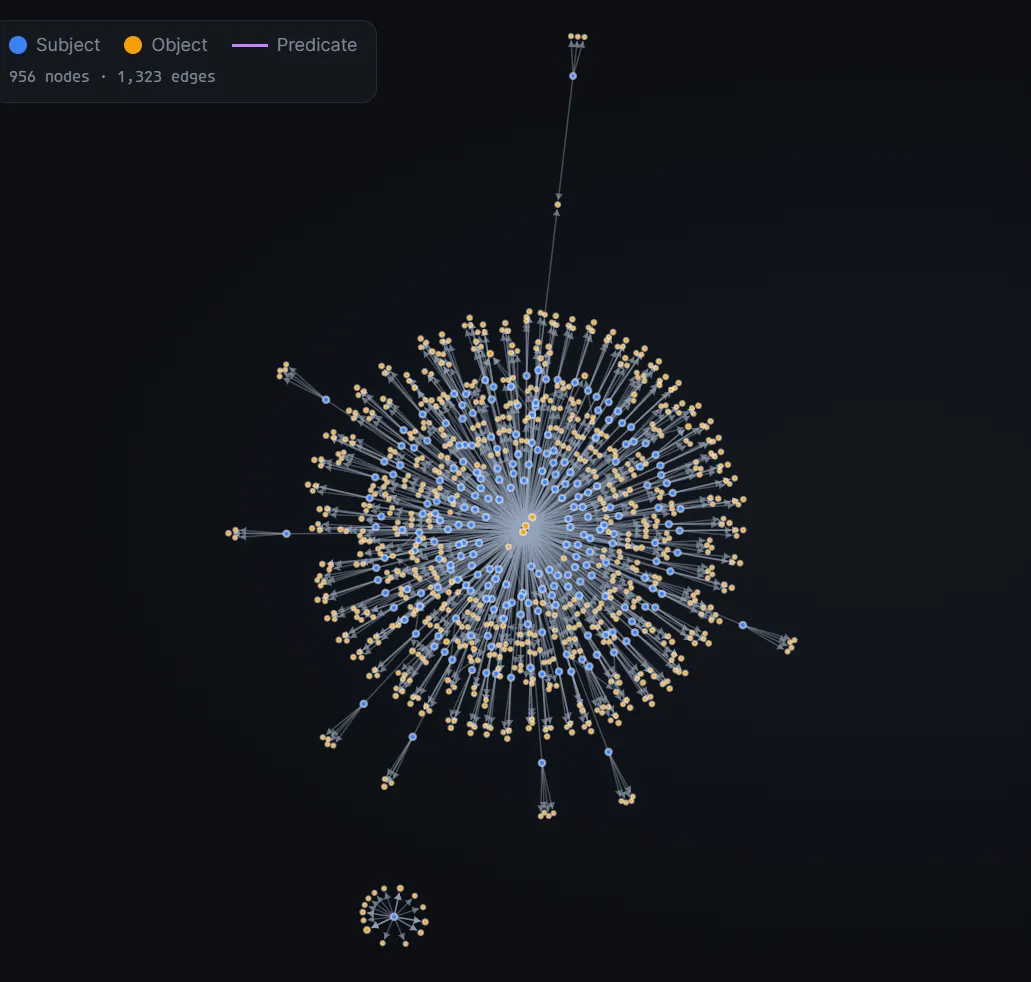
Similar to GlobalKnowledge, we can also retrieve all the triples in graph.db. However, they are stored in stable_graph table instead. The triples stored here are mostly personal data like the apps you have installed, your contacts and relationships etc.
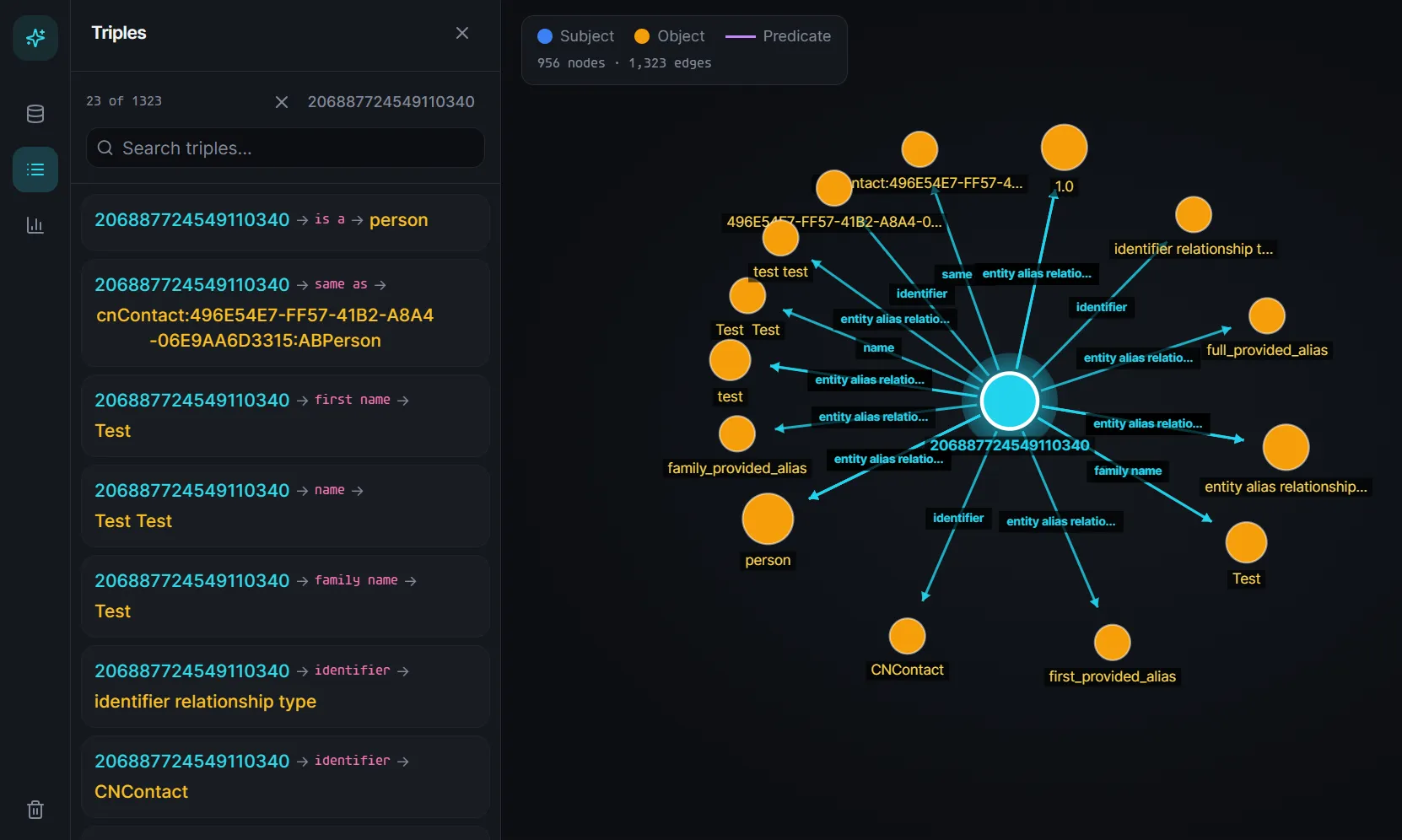
For example, if we add a contact Test Test, it will show up in our knowledge graph that it is a person.
Other stores
There are other databases that exist, but are not used in the Knosis query layer.
For example, if we reverse the KnowledgeConstructionXPC.Server.runFastpassPipeline(with:) function, we see that it eventually calls PhaseStores.init(config:). And that requires 2 additional stores on top of the previous ones.
KeyValueDatabase
The backing database of this is keyvalue.db and shared among these stores:
- VisionKeyValueStore
- ResolverKeyValueStore
- RelationshipKeyValueStore
- PortraitTopicKeyValueStore
- WalletOrderKeyValueStore
The only table here that is significant is:
CREATE TABLE "keyvalue" ( "domain" TEXT, "key" TEXT, "value" BLOB, PRIMARY KEY("domain","key") ON CONFLICT REPLACE);It serves only as a registry to store pipeline information. Here’s a helper script to dump all the value bplist.
import plistlibimport sysimport sqlite3import pandas as pdfrom collections import defaultdict
db_conn = sqlite3.connect(sys.argv[1])df = pd.read_sql_query("SELECT domain, key, value FROM keyvalue ORDER BY domain, key;", db_conn)db_conn.close()
registry = defaultdict(list)
for _, row in df.iterrows(): decoded_val = plistlib.loads(row['value'])[0] registry[row['domain']].append((row['key'], decoded_val))
domains = list(registry.keys())for i, domain in enumerate(domains): is_last_domain = (i == len(domains) - 1) domain_connector = "┗━━ " if is_last_domain else "┣━━ " print(f"{domain_connector}{domain}") entries = registry[domain] for j, (key, value) in enumerate(entries): is_last_key = (j == len(entries) - 1) tree_prefix = " " if is_last_domain else "┃ " key_connector = "└── " if is_last_key else "├── " val_repr = repr(value) print(f"{tree_prefix}{key_connector}{key}: {val_repr}") if not is_last_domain: print("┃")StateStore
Seems to store information about the piplines and works in tandem with the KeyValueDatabase (not very sure about this yet).
CREATE TABLE "task_progress" ( "token" BLOB, "sourceName" TEXT, "entityClass" TEXT, "stage" TEXT, "pipelineType" INTEGER, PRIMARY KEY ("sourceName", "entityClass", "stage", "pipelineType") ON CONFLICT REPLACE)Others
So who actually uses the Knosis server?
Looking within the IntelligencePlatform.framework, PersonalKnowledgeTool pops up immediately.
static PersonalKnowledgeTool.perform(knosisServer:ecrServer:kgq:nlQuery:)
I haven’t spend a lot of time reversing this functionality yet, but it seems to be able to handle natural language queries and will resolve the queries with context pulled from the Knosis server.
ecrServerseems to be in charge of entity-candidate resolution.
There are other servers other than Knosis that are part of the whole knowledge construction, normalisation and resolver pipeline.
com.apple.intelligenceplatform.KnowledgeConstructioncom.apple.intelligenceplatform.EntityResolutioncom.apple.intelligenceplatform.Lighthousecom.apple.intelligenceplatform.Knosiscom.apple.intelligenceplatform.Coordinationcom.apple.intelligenceplatform.InternalInternalBiomecom.apple.intelligenceplatform.View
Final Thoughts
This small reversing project stemmed from my curiosity about Apple Intelligence’s internals. As I reversed more of the functionalities, it slowly became pretty overwhelming to see so many different servers interacting with each other. It also didn’t help that Swift decompilation is ugly and annoying to fix.
Honestly, I’m not sure how broadly useful this research is right now given my fragmented understanding of the whole system, but hey at least it kept me occupied and satisfied my curiosity during my break.
That said, I think there is potential forensics value in the stored triples within the databases, and perhaps opportunities for better integrations with third-party LLMs/AI tools down the line. But for now, I’ll reverse the other parts of the system when I have time (hopefully)…